New in Version 3.1 — the notepad release

Focus on the conversation. Tagalong captures the rest.

Tagalong is a real notepad for your meetings. Jot shorthand while it transcribes live on your Mac, then one tap turns your notes into the notes you wish you'd written — speakers identified, summary and action items ready. No bots. No browser tabs.

Tagalong
Home
Search
Visual Notes
Today
Q1-Roadmap-Sprint-Kickoff
24 min ago
Meeting-Jul-03-2026-917
1h ago
Croatia-vs-Portugal
2h ago
Design-Review-Onboarding
2h ago
Pipeline-Review-EMEA
5h ago
Outbound-Rules-of-Engage…
6h ago
Yesterday
1-1-with-Maya
Yesterday
Customer-Call-Northwind
Yesterday
Release-Planning-3-2
Yesterday
Discuss-Release-Announce…
Yesterday
Record
Pro
Q1-Roadmap-Sprint-Kickoff
5 speakers
Visual Note
Notes12
Recording21:32
You Meeting
Enhance my notes
5 additions from the transcript
EnhancedOriginal
Revert
Body BI
Q1 Roadmap & Sprint Kickoff
Roadmap ownership finalized across three team leads; bi-weekly sprint planning confirmed, starting Monday.
John — customer onboarding: designs are ready; wireframes start next week.
Alex — API migration: leads the migration, two sprints from Monday, targeting v2 endpoints.
Sarah — roadmap doc continues as owner; draft due EOD Friday.
Follow-up Tuesday: sprint assignments review.
Action Items
Ask anything about this meeting…
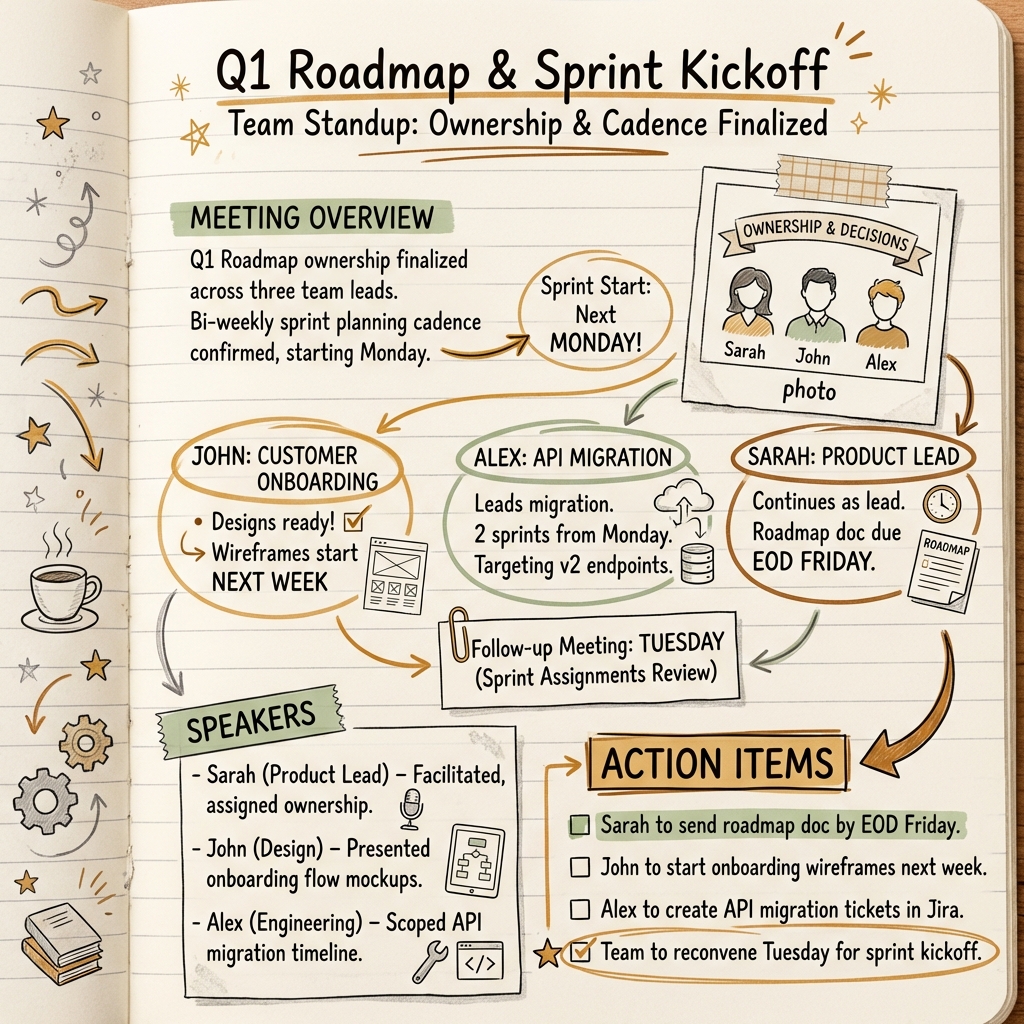
Visual note — a sketchnote infographic generated from the meeting
Take shorthand during the meeting — every line remembers its moment.
No meeting bots. Live transcription runs on-device — your words never leave your Mac during the meeting.

Everything you need. Nothing you don't.

A real notepad at the center, with AI that fills in everything you didn't have time to write.

A Real Notepad

Notes lead every meeting. Headings, lists, checklists, highlights, full keyboard shortcuts — and every line remembers when you wrote it. Click a margin timestamp and playback jumps to that moment.

Enhance My Notes

One tap rewrites your shorthand into real meeting notes, filling in specifics from the transcript. Your original stays one toggle away, with full revert.

Pro

Instant Live Transcription

Words appear on screen as they're spoken, transcribed on-device. Nothing leaves your Mac during the meeting — it even works offline.

Conference Mode

Capture your mic and the meeting's audio from Zoom, Meet, or Teams — no bot, no browser extension. Live channel meters confirm both sides are coming through.

Pro

Automatic Action Items

Every meeting gets action items with owners, priorities, and due-date hints. Send them to Apple Reminders or Todoist in one click.

Pro

Visual Notes

Turn any meeting into a 4K visual summary, bound into a sketchbook you can flip through. 7 styles, 4 aspect ratios, custom color palettes.

Pro

TL;DR-First Summaries

Summaries open with the TL;DR and decisions, every speaker identified automatically. Six built-in recipes — from Executive Brief to Follow-Up Email — or write your own.

Ask AI & Search

Ask questions about any meeting — even while it's still happening — and search across every transcript and note you've ever taken.

Pro

Three steps. No learning curve.

Take the notes you'd take anyway. Tagalong turns them into the record of the meeting.

Capture

Tagalong notices your meeting starting and can begin recording automatically — or press Cmd+Shift+R. Conference mode captures both sides of the call.

Jot

Type shorthand in the notepad while live transcription runs on-device — every word on screen instantly, nothing leaving your Mac.

Stop

Speakers are identified, your notes are enhanced from the transcript, and a summary with action items is ready — all processed in the background.

Start free, upgrade when you need more

No credit card required. Try the core features with up to 5 meetings per month.

Free
$0 /mo
Free forever
  • 5 meetings per month
  • Microphone recording
  • Instant on-device live transcription
  • The full notepad, speaker renaming
  • Basic AI summary
  • Markdown export
  • Conference mode
  • Enhance My Notes
  • Action items & Visual Notes
  • AI chat & calendar integration
Download Free
Private License
$199 once
One-time payment, yours forever
  • Unlimited meetings
  • Everything in Pro
  • Bring your own API keys
  • Audio goes direct to AI providers
  • Nothing passes through our servers
  • Files stored locally on your Mac
  • No recurring cost
  • Full data ownership
Get Private License

The meeting tool that never joins the call

See how Tagalong compares to meeting tools that put a bot in your call.

Feature Tagalong Granola Otter Fireflies Fathom
Bot joins call? ✓ No ✓ No Yes Yes Yes
On-device live transcription ✓ Default
Speaker diarization Full — automatic Limited
Visual notes (infographics) ✓ 7 styles
Private API keys ✓ Your keys
One-time purchase $199 Private License No No No No
Data stays on your Mac ✓ With Private License
AI summary ✓ TL;DR-first, 6 recipes
Audio playback
Starting price Free $18/mo $16.99/mo $18/mo $19/mo

Frequently asked questions

With a subscription, Tagalong handles the API keys for you — nothing to configure. With a Private License, you bring your own keys: one for transcription and summaries (OpenAI), one for automatic speaker identification, and optionally a Google Gemini key for Visual Notes. The guide walks through the exact setup.
Yes. Conference Mode captures system audio from any app on your Mac — Zoom, Meet, Teams, Webex, and anything else that plays sound. No browser extension or meeting integration required. You can also import recorded audio files (MP3, WAV, M4A, MP4, AAC) for post-meeting processing.
No. Live transcription runs on-device by default — the words you see appear instantly, work offline, and never leave your Mac while the meeting is happening. After you stop, the transcript, summary, and Visual Notes are generated in the cloud: through Tagalong's managed proxy on a subscription, or directly from your Mac to each AI provider with a Private License.
Your recordings and notes are saved as local files in ~/Documents/Tagalong/ on your Mac — you own your data. With a Private License, your API keys stay in the macOS Keychain and every cloud request goes directly to the AI provider; nothing passes through our servers. It's the mode we recommend for the most privacy-sensitive teams.
Tagalong requires macOS 15.0 (Sequoia) or later. It runs natively on both Apple Silicon and Intel Macs as a universal binary.
The Free tier is always available — no credit card, no time limit. You get 5 meetings per month with mic recording, instant on-device live transcription, the full notepad, basic AI summaries, speaker renaming, and markdown export. Upgrade to Pro when you need unlimited meetings and features like conference mode, Enhance My Notes, action items, and Visual Notes.